Configuration & controls
The default Lua configuration defines independent actions and a modal hyprflow submap. Start with the hyprpm installation and quick controls. The full configuration file waits until the plugin is loaded before applying settings and bindings; Hyprland rereads the configuration after loading a plugin.
Workspace count
hl.config({ plugin = { hyprflow = { workspace_count = 9, include_empty_workspaces = true } } })workspace_count defaults to 9, with an allowed range of 1–32. Numeric cards do not create real workspaces until accepted. Existing workspaces on the focused monitor, including named workspaces, are also included. Workspaces on other monitors and special workspaces are excluded from navigation; an active special overlay is included in the original card.
include_empty_workspaces defaults to true. Set it to false to include only existing workspaces with windows on the focused monitor. Empty numeric placeholders and empty named or persistent workspaces are omitted, regardless of workspace_count. The list is rebuilt each time coverflow opens.
If the current workspace is empty, navigation starts on the next populated workspace by ID, or the last one if there is no next workspace. Cancel still returns to the original empty workspace. If no eligible workspace has windows, coverflow stays closed.
Default bindings
| Binding | Action |
|---|---|
| Super + Tab | Open; toggle reverses entry or closing |
| Super + Alt + Left / Right | Open and move selection |
| Super + Alt + 1–9 | Open and jump to a workspace |
| Left / Right while open | Move selection |
| 1–9 while open | Animate to that workspace |
| Return | Expand and activate selection |
| Escape | Return to original workspace |
By default, selection is separate from activation. Jumps travel through intermediate covers and leave the flow open until accepted or canceled. Invalid targets return an error, and navigation clamps at the ends.
Select on release
hl.config({ plugin = { hyprflow = { select_on_release = true } } })select_on_release defaults to false. When enabled, Hyprflow remembers the modifiers held when a flow opens and accepts the selected workspace once all of those modifiers are released. For example, open with Super + Tab, browse while holding Super, then release Super to activate the selection using the normal expansion animation. Releasing Tab or an arrow alone keeps it open. For Super + Alt shortcuts, release both opening modifiers. Caps Lock and Num Lock do not participate.
The option is read when opening a new flow; changes apply to the next flow. Opening without a held modifier, such as with F10 or an IPC action, keeps manual acceptance. Return, Escape, and toggle still work; an explicit accept, cancel, or toggle disarms automatic acceptance for that flow. Keep { ignore_mods = true } on Return and Escape so they work while modifiers are held.
The existing Lua actions run on key press. No { release = true } binding is needed. For repeated Super + Tab browsing, replace the existing Super + Tab binding and hyprflow submap with this minimal cycling setup:
hl.bind("SUPER + Tab", function() hl.plugin.hyprflow.right() end)
hl.define_submap("hyprflow", function()
    hl.bind("SUPER + Tab", function() hl.plugin.hyprflow.right() end)
    hl.bind("SUPER + SHIFT + Tab", function() hl.plugin.hyprflow.left() end)
    hl.bind("Left", function() hl.plugin.hyprflow.left() end, { repeating = true })
    hl.bind("Right", function() hl.plugin.hyprflow.right() end, { repeating = true })
    hl.bind("Return", function() hl.plugin.hyprflow.accept() end, { ignore_mods = true })
    hl.bind("Escape", function() hl.plugin.hyprflow.cancel() end, { ignore_mods = true })
    hl.bind("catchall", function() end)
end)
This opens one card to the right and moves one card per Tab press, clamping at the ends. Shift reverses the direction while Super remains held. Keep any additional navigation bindings you want inside the submap.
The release-selection regression uses real virtual-keyboard chords in an owned nested session with the candidate plugin loaded:
python3 scripts/verify-select-on-release.py "$session_dir" --artifact "$PWD/build/hyprflow.so"It covers the false default, forward/reverse cycling, partial and quick releases, explicit accept/cancel/toggle, unmodified entry, lock keys, failed-open cleanup, and unloading while armed.
Lua actions and dispatchers
| Lua action | Dispatcher | Effect |
|---|---|---|
hl.plugin.hyprflow.toggle() | hyprflow:toggle | Open or reverse the transition |
hl.plugin.hyprflow.left() | hyprflow:left | Move one card left |
hl.plugin.hyprflow.right() | hyprflow:right | Move one card right |
hl.plugin.hyprflow.jump(id_or_name) | hyprflow:jump | Select a numeric or named workspace |
hl.plugin.hyprflow.accept() | hyprflow:accept | Activate the selection |
hl.plugin.hyprflow.cancel() | hyprflow:cancel | Return to the original workspace |
For example:
hyprctl dispatch hyprflow:toggle
hyprctl dispatch hyprflow:jump 4
hyprctl eval 'hl.plugin.hyprflow.left()'
hyprctl repl 'return hl.plugin.hyprflow.status()'
Custom bindings
hl.bind("SUPER + F", function() hl.plugin.hyprflow.toggle() end)
hl.bind("SUPER + ALT + Right", function()
    hl.plugin.hyprflow.right()
end, { repeating = true })
Keep the default modal submap when adding bindings. Its catchall consumes unrelated keys, including keys that could otherwise reach an input method. The previous submap and client focus are restored on exit.
Flow appearance
These options belong under plugin.hyprflow in Lua configuration. They update an open flow on its next rendered frame. Cards use the native workspace aspect ratio; wide and portrait workspaces have no matte padding. These defaults replace the original square-cover geometry.
hl.config({ plugin = { hyprflow = {
    workspace_scale = 0.9,
    workspace_spread = 0.25,
    workspace_overlay = 1,
    background_color = "rgba(101827dd)",
    background_opacity = 0.45,
    background_blur = 16,
    reflection_opacity = 0.2,
    center_y = 0.45,
    show_labels = 1,
    border_width = 3,
    border_color = "rgba(ffffff55)",
    border_color_current = "rgba(33ccffee) rgba(00ff99ee) 45deg",
    border_color_focus = "rgba(ffdd44ff) rgba(ff66aaff) rgba(6688ffff) 90deg",
} } })
The default configuration contains the complete default values and assignable keys. The existing workspace_count option is unchanged.
Size and spacing
workspace_scale multiplies the card width, min(0.58 × monitor height, 0.38 × monitor width). Card height is that width multiplied by monitor height / monitor width, including portrait monitors. Its default is 1.0; the valid range is 0.1 through 2.0. Cards, reflections, and label placement follow this size. Large values can extend cards beyond the viewport. Entry and exit still begin/end at the full native desktop size.
workspace_spread sets the spacing between inactive card centers in units of the configured card width, before perspective projection. The default is 0.18, with a valid range of 0 to 1. Zero collapses the inactive stack; larger values spread it out. The nearest cover stays at its original position, and the transition curve’s endpoint slope changes with the spacing to preserve continuous travel. Perspective, yaw, and spring timing are unchanged.
Desktop overlay and background
| Setting | Default | Range / behavior |
|---|---|---|
workspace_overlay | 0 | 0: solid stage; 1: current workspace behind the cards |
background_color | rgb(000000) | One color in the same hex formats as borders; no gradient |
background_opacity | 1.0 | 0–1; multiplied by the color's alpha |
background_blur | 0.0 | Gaussian kernel radius, 0–64 logical pixels; overlay only |
reflection_opacity | 0.34 | 0–1; zero skips reflection draws |
center_y | 0.4 | 0–1, vertical center as a fraction of monitor height |
show_labels | 1 | 0: hide captions; 1: show captions |
Overlay uses a refreshed capture of the workspace where the switcher opened, including its special overlay and pinned windows. Selecting another card keeps that original desktop behind the stack until acceptance. It remains visible while input is captured by the switcher's modal controls. The desktop tint and blur fade in during entry and out during exit; the cards stay sharp. A blur of zero bypasses the kernel. Blur prefilters a reduced-resolution desktop capture, applies separate nine-tap horizontal and vertical Gaussian passes, and linearly upsamples the result. The radius scales with monitor scale. Blur adds offscreen render passes; software rendering can cost more GPU time.
On the solid stage, background_color blends over black using color alpha × background_opacity. With overlay enabled, the same tint blends over the desktop; background_opacity = 0 exposes the desktop, and 1 with an opaque color hides it. Use numeric 0/1 for the two switches.
For example, a clear desktop with a compact stack and no reflection or caption:
hl.config({ plugin = { hyprflow = {
    workspace_overlay = 1, background_opacity = 0, background_blur = 0,
    workspace_scale = 0.8, workspace_spread = 0.3,
    reflection_opacity = 0, show_labels = 0, center_y = 0.5,
} } })
The configuration video shows the solid stage, clear desktop overlay, and tinted blurred overlay with gradient borders. See the current appearance verification.
Borders
border_width is the inset stroke width in logical pixels, before the card’s perspective projection. It accepts integers from 0 to 32; zero, the default, disables borders. The stroke follows the full workspace rectangle. It foreshortens with the card, appears in its reflection, and fades out at the full-desktop entry/exit endpoints. The label has no border.
The color options use Hyprexpo’s modern naming and documented hex forms:
rgb(RRGGBB)is opaque RGB.rgba(RRGGBBAA)puts alpha last.0xAARRGGBBputs alpha first.- One to ten whitespace-separated colors form equally spaced gradient stops. An optional final angle uses
deg, for example45deg.
The native Hyprland gradient shader supplies Oklab color interpolation and its angle convention: 0deg runs left to right, 90deg top to bottom. Angles are normalized modulo 360 and rendered at whole-degree precision; for example, -45deg becomes 315deg, and 45.9deg becomes 45deg. Color prefixes are lowercase; hex digits may use either case. Numeric/comma color functions and CSS # colors are not accepted.
border_color defaults to opaque white. border_color_current and border_color_focus default to empty strings:
- A nonempty focused override wins on the selected destination.
- Otherwise, a nonempty current override applies to the workspace where the flow began, including when it is also selected.
- All other cases use the base color.
Set a role to transparent, such as rgba(00000000), to suppress its border instead of inheriting. Set it to an empty string to restore inheritance.
This follows Hyprexpo’s modern color options and precedence. Its deprecated border_style and border_grad_* aliases are not introduced. Gradient interpolation reuses the matching Hyprland shader, and color conversion uses the compositor’s parser and Oklab cache.
Invalid settings and reloads
Out-of-range or nonfinite numeric appearance values, invalid switches/widths, malformed colors, nonfinite angles, and more than ten stops are not applied. The previous valid value remains effective. Hyprflow logs a rejection and posts a notification once per changed invalid value. Restoring a valid value resets that suppression.
Hyprland 0.56’s Lua plugin path drops registered bounds and string validators. Consequently, hl.config() can return success and getoption can show an invalid raw value even though Hyprflow rejects applying it. Validation therefore also runs at the plugin’s rendering boundary and after config-file reloads; it does not depend on host validation or mutate the host’s config registry.
Hyprland 0.57 enforces those validators itself. An invalid value is reported in hyprctl configerrors and never replaces the previous value, so Hyprflow’s own rejection diagnostic does not appear; the retained appearance is the same. See the upstream conversion path.
Tests
The current appearance proof checks monitor aspect, overlay origin, tint and opacity pixels, background blur with sharp cards, reflections, captions, vertical placement, invalid settings, borders, reloads, and accept/cancel cleanup. Start with the seven calibration fixtures and the exact loaded plugin:
python3 scripts/verify-appearance.py "$session_dir" /tmp/hyprflow-appearance \
    --artifact "$PWD/build/hyprflow.so" \
    --sha256 "$(sha256sum build/hyprflow.so | cut -d' ' -f1)" --video
python3 scripts/caption-appearance-video.py /tmp/hyprflow-appearance
The script replaces only the owned session's test fixtures for the detailed blur check and video. manifest.json records each scene's complete configuration and timing; configurations-raw.mp4 is the compositor recording. The published demo adds preset captions using Pillow and FFmpeg. Capture preserves variable frame timestamps; the caption tool rejects a recording whose duration does not match the preset timeline. The earlier baseline/candidate border proof is retained for historical comparisons; its square-default equality assertion is superseded by the native-aspect assertion above.
make check format-check covers the build, pure geometry tests, Python syntax, Cppcheck, and formatting. The geometry suite checks original defaults, resizing, custom spread, symmetry, ordering, perspective preservation, and continuity at the center/stack transition.
scripts/verify-configuration.py compares a baseline and candidate loaded sequentially in the same owned nested session. It uses actual compositor pixels to check default equivalence, size, spacing, border width, alpha, gradients, angles, state precedence, and last-valid behavior. It also exercises config reload and plugin unload/reload. Run its --help for exact phase arguments. It uses the existing nested-session helpers, grim, and the already-installed Pillow test tooling; there are no new plugin dependencies.
Historical border verification
The proof summary records the tested artifact and exact-build mapping checks. Before the workspace-aspect update, five complete default PNGs were byte-identical to the original plugin in the same nested compositor. Customized size, spacing, 2/8-pixel borders, alpha, state precedence, three/ten-color gradients, and angle normalization pass actual pixel assertions.
The suite also covers 26 invalid-value cases, deduplicated diagnostics, invalid file reloads while closed, the shipped Lua example, custom reloads, keyboard isolation, and ten plugin unload/reload cycles. Both compositor and fixture processes were stopped, with the owned host window restored. Raw failed attempts remain in a private local archive; the published proof set includes passing receipts without host paths or memory addresses.
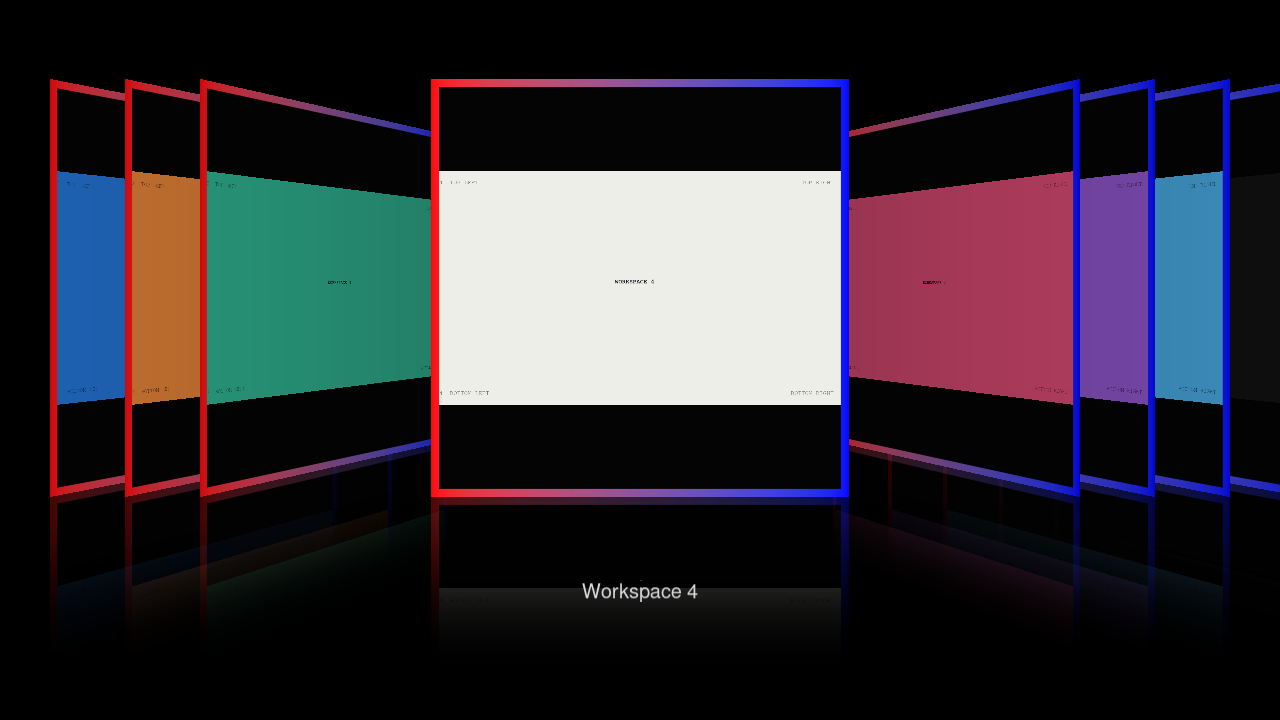
These solid calibration workspaces make border geometry and colors measurable. The lifecycle test now compares state before and after retargeting inside one Lua callback. Separate IPC observations could straddle a normal render tick and misidentify spring progression as a discontinuity.
Runtime qualification covers Hyprland 0.56.2 and 0.57.0/OpenGL at scale 1. Other compositor ABIs, HDR, rotated/fractionally scaled outputs, and interactions with other plugins were not added to the qualification scope by this change.